Inputs
- Image(s): Input.
- Mask(s): (Optional) Mask.
Inputs
Widgets
Outputs
Classic computer vision algorithm that finds outline edges in an image.
| Widget | Type | Description |
|---|---|---|
| lowerThreshold | Int | Minimum intensity gradient to be considered an edge. |
| upperThreshold | Int | Maximum intensity gradient. Values between Lower and Upper are accepted if connected to a strong edge. |
| dilate | Bool | Thicken the detected edges. |
| kernelSize | Int | Blur kernel size to reduce noise before detection. |
| iterations | Int | Number of times to dilate (thicken) the edges. |
| colorMap | Dropdown | Color scheme for the output (e.g., ‘winter’, ‘bone’, ‘jet’). |
Inputs
Widgets
Outputs
Assigns persistent IDs to objects across video frames. If Box A in frame 1 is close to Box B in frame 2, they obtain the same ID.
Inputs
Widgets
Outputs
Finds the shapes (contours) inside a binary image. Useful for turning a mask into vector data or bounding boxes.
Inputs
Widgets
Outputs
Uses the brightness of the Displacement Map to push pixels of the Image(s).
Inputs
Widgets
Outputs
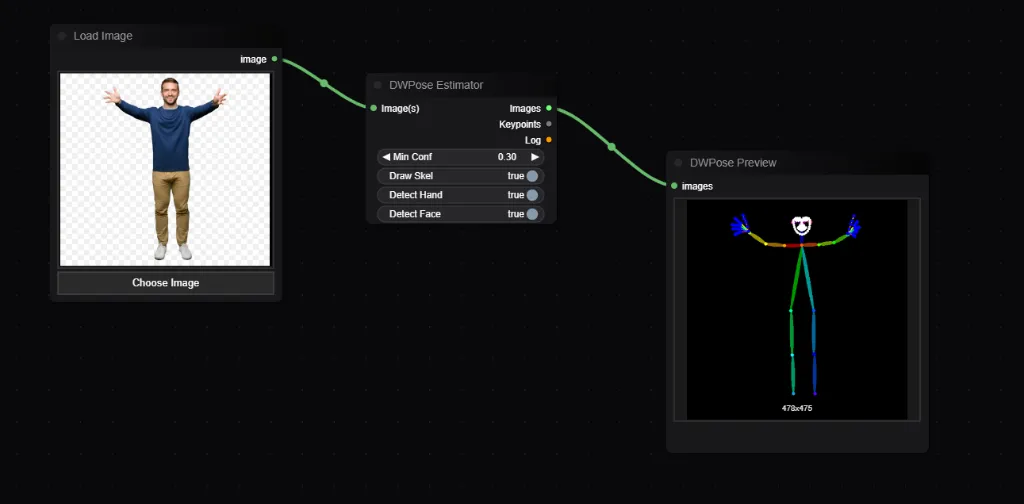
Accurately detects human poses (Stickman representation). Essential for ControlNet OpenPose workflows.
| Widget | Type | Default | Description |
|---|---|---|---|
| Min Confidence | Float | 0.3 | Minimum score to consider a person detected. |
| Draw Skeleton | Bool | True | Draws the colorful stickman overlay on the output image. |
| Detect Hand | Bool | True | detects fingers and hands (slower). |
| Detect Face | Bool | True | detects facial landmarks (slower). |
Inputs
Widgets
Outputs
Samples the average color or value of specific regions (Tiles) from the image.
Inputs
Widgets
Outputs
Automatically “learns” the static background of a video and outputs a mask of anything that is moving (Foreground).
Inputs
Widgets
Outputs
Simple “Frame Difference” motion detection. Subtracts Frame B from Frame A to see what changed.
Inputs
Widgets
Outputs
The “Plexus” effect. Draws lines between any two points that are close enough to each other. Great for visualizing tracking data.
| Widget | Type | Description |
|---|---|---|
| Threshold | Float | Maximum distance between two points to create a connection. |
| Max Connections | Int | Maximum number of lines per point. |
Inputs
Widgets
Stutter (skip frames) or Normal.Outputs
Simulates a stop-motion animation effect by reducing the frame rate and optionally adding jitter to mimic hand-placed imperfections.
| Widget | Type | Description |
|---|---|---|
| Frame Rate | Int | The target frame rate for the stutter effect (e.g., 12fps is common for stop motion). |
| Jitter Amount | Float | Amount of random position shift applied to each frame step. |
| Mode | Dropdown | Stutter: Holds frames to match the target FPS. |