Inputs
None
Object detection nodes let you identify, locate, and segment objects in images. Use loader nodes to configure each model’s weights, then connect them to the corresponding detector or segmentation node.
Inputs
None
Widgets
Outputs
Downloads and loads Microsoft Florence-2 model weights. The loaded model is passed directly to the Florence-2 Object Detection node. Florence-2 is a universal vision model capable of detection, captioning, OCR, and more — all driven by a text prompt.
Inputs
Widgets
Outputs
A universal vision node powered by Microsoft Florence-2. Unlike YOLOX which is limited to 80 COCO classes, Florence-2 is open-vocabulary — you describe what you want to detect in plain text and it finds it. It also supports captioning, OCR, and dense region proposals.
| Widget | Type | Description |
|---|---|---|
| Text Prompt | Text | Comma-separated object names (e.g., person, car) for detection, or a free-form query for captioning/OCR tasks. |
| Task | Dropdown | The vision task to execute. See task options below. |
| Task | Description |
|---|---|
| Object Detection | Detect objects matching the text prompt. |
| Phrase Grounding | Ground a natural language phrase to image regions. |
| Open Vocabulary Detection | Detect any concept described in text. |
| Caption | Generate a short caption for the whole image. |
| Detailed Caption | Generate a longer, more descriptive caption. |
| More Detailed Caption | Maximum detail caption. |
| Dense Region Caption | Caption every detected region individually. |
| Region Proposal | Return object-like regions without labels. |
| OCR With Region | Extract text and its bounding box location. |
Inputs
None
Widgets
Outputs
Loads the weights for Segment Anything Model 2 (SAM2). Connect the output to the SAM2 Segmentation node.
Inputs
Widgets
Outputs
Segment Anything Model 2 (SAM2). The state-of-the-art model for “cutting out” objects from images. Can be guided with point prompts or run automatically.
Inputs
None
Widgets
Outputs
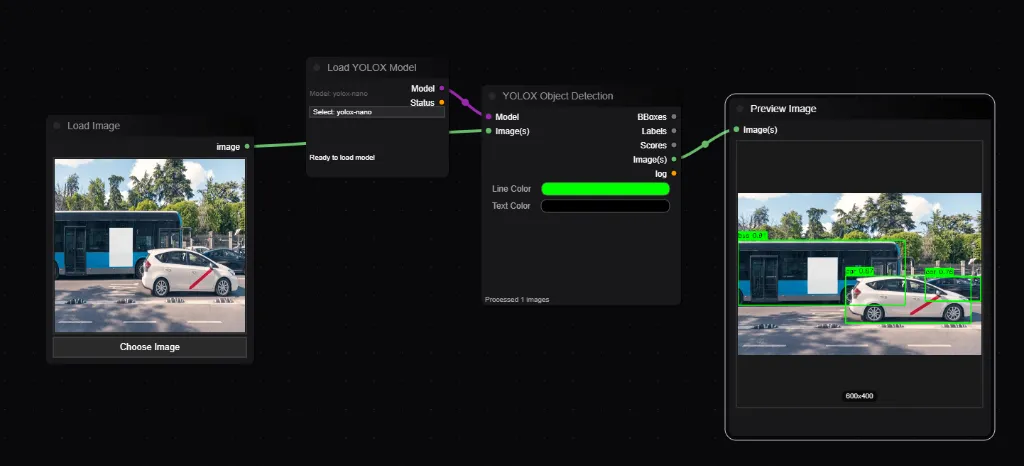
Loads the weights for the YOLOX object detection architecture. Connect the output to the YOLOX Object Detection node.
| Widget | Type | Description |
|---|---|---|
| model_name | Dropdown | nano (fastest) to x (most accurate). |
Inputs
Widgets
Outputs
| Widget | Type | Default | Description |
|---|---|---|---|
| confidence_threshold | Float | 0.5 | Minimum certainty required to detect an object. |
| nms_threshold | Float | 0.45 | Non-Maximum Suppression. Higher values merge overlapping boxes less aggressively. |
| box_color | Color | #00FF00 | Color of the bounding box lines. |
| label_color | Color | #000000 | Color of the label text. |
| show_labels | Bool | True | Draw class names (e.g. “person”) on the image. |
| show_scores | Bool | True | Draw confidence percentages on the image. |
Detects 80 different classes of objects (COCO dataset) in an image, returning their bounding boxes and labels.